
Compatible hardware
The iPhone app for GPS DTR 25000 collars
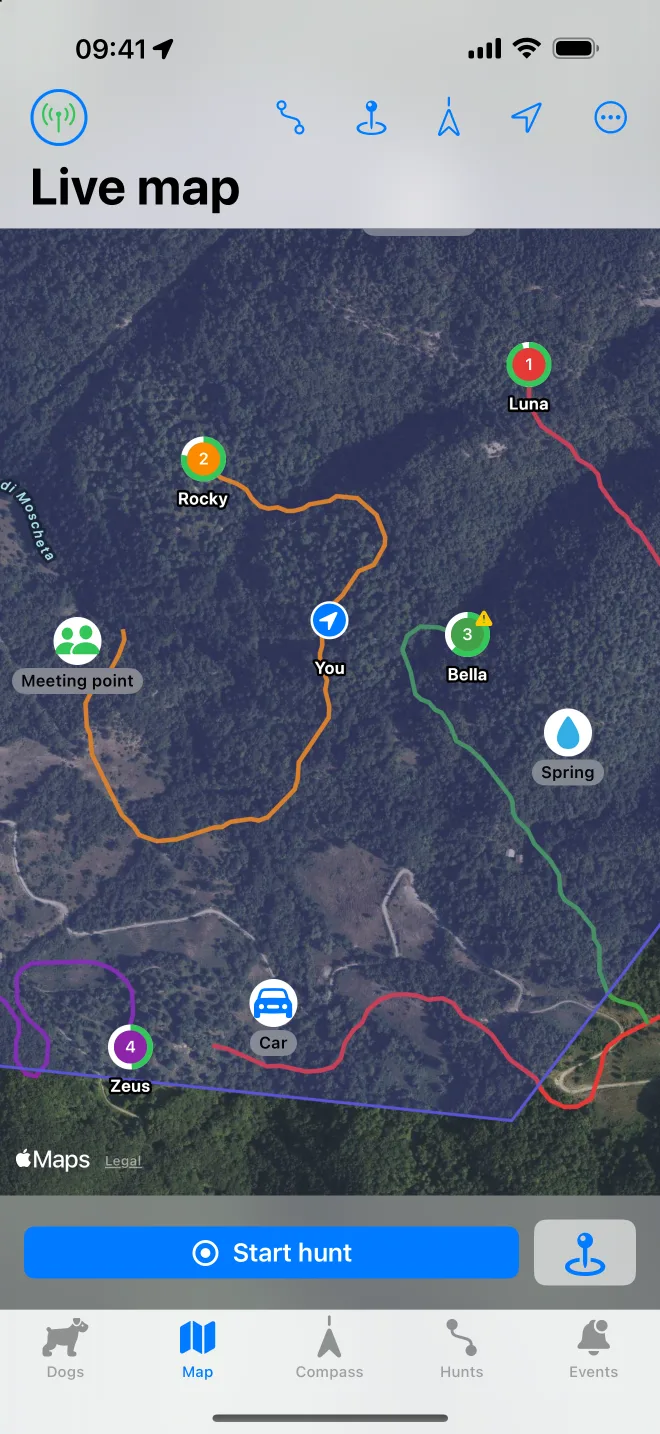
Yes, the GPS DTR 25000 works with an iPhone. DogTrak connects to the handheld remote over Bluetooth and shows every collar on a map and a compass, on iPhone and iPad.

Independent app, not made by the collar manufacturer.
How it works
Nothing changes on the collars. They keep sending their position by radio to the handheld remote, as they always have. The remote has Bluetooth built in, and DogTrak uses it to read the same positions on your phone.
- CollarGPS position of the dogRadio
- Handheld remotereceives the collars by radioBluetooth
- iPhone or iPadDogTrak over Bluetooth
The phone does not need mobile coverage to receive the dogs’ positions: they arrive over radio and Bluetooth. Only the map imagery needs a data connection, and the compass works without it.
Supported models
DogTrak supports the handheld remote of the GPS DTR 25000 family with these collar models:
- GPS-DTR-25000-PRO
- GPS-25000-PRO
- GPS-BEEPER-433-PRO
- GPS-BEEPER-2000-PRO
If your model is not listed, write to support@dogtrak.app before buying and I will tell you what I know.
Connect your remote in four steps
Turn on the remote and the collars
Pair the collars with the remote as described in its manual, if you have not already.
Open DogTrak and tap the connection icon
Allow Bluetooth when iOS asks. The app searches for remotes nearby.
Choose your remote
Wait for the status to show Ready. You can let the app reconnect automatically next time.
Watch the dogs appear
Each dog shows up as soon as its collar sends a GPS position. Give them a name and a colour.
What you get on the phone
Live map
All paired collars on satellite or standard maps, with trails, battery, speed and distance.
Compass
A needle for each dog with bearing and distance, for when you need to walk straight to it.
Geofence and distance alerts
Draw an area or set a maximum distance and be told when a dog crosses it.
Spoken events
Dog on point, moving again, low collar battery and more, read out loud with the dog’s name.
Hunt recording
Record the tracks of dogs and hunter, replay them, export KML.
Collar settings
Send a tone and the remote’s training commands, set how often the collar reports its position, adjust beeper sounds.
Good to know
- You still need the handheld remote: the phone talks to the remote, not directly to the collars.
- Alerts work while the remote stays connected to the phone over Bluetooth, so keep them together.
- Range between collars and remote is the range of your hardware. The app does not change it.
- Map imagery is loaded online. Dog positions, compass and alerts work without mobile coverage.
Questions about the GPS DTR 25000 and iPhone
Is there an iPhone app for the GPS DTR 25000?
Yes. DogTrak is an iPhone and iPad app that connects to the GPS DTR 25000 handheld remote over Bluetooth and shows your collars on a map and compass. It is an independent app, available on the App Store.
Does the GPS DTR 25000 work with iOS?
The handheld remote uses standard Bluetooth Low Energy, which every recent iPhone and iPad supports. DogTrak needs iOS 17 or later.
Do I need to change anything on my collars or remote?
No. Nothing is installed or changed on the collars or the remote. The app only reads the positions the remote already receives.
How many dogs can I follow?
As many as your remote handles: up to 9 collars.
Does it work without mobile signal?
Dog positions arrive by radio and Bluetooth, so they do not need mobile coverage. The compass, distances and alerts keep working. The map background needs a data connection to load new areas.
Is there a subscription?
No. DogTrak is a one-time purchase with no subscription, no account and no ads.
Is DogTrak the official app?
No. DogTrak is developed independently and is not affiliated with or endorsed by Hunter Electronics. The product name is used only to say which hardware the app is compatible with.
DogTrak is an independent app. It is not affiliated with, endorsed by or sponsored by Hunter Electronics. GPS DTR 25000 and other product names are trademarks of their respective owners and are used only to indicate compatibility.
Put your GPS DTR 25000 on your iPhone.
One-time purchase on the App Store. iPhone and iPad, iOS 17 or later.